
How to manage multiple Facebook ad accounts without switching tabs
In short
To manage multiple Facebook ad accounts, keep them in a business portfolio, give each person only the access they need and check all accounts from one view. A business portfolio brings your ad accounts, Pages and Instagram accounts together in one place (Meta Business Help).
Can you have more than one ad account?
Yes. When you sign up for Facebook, you get one ad account by default. If you run ads for several brands, projects or clients, Meta recommends a business portfolio, in which you can create one or several ad accounts (Meta Business Help).
Meta does set limits (Meta Business Help):
- One person can manage up to 25 ad accounts.
- An ad account can be assigned to up to 25 people.
- A business can create only one ad account until it has made a confirmed payment.
- A closed ad account stays in your business portfolio and still counts toward your limit.
If you work for clients, there is one more rule. Meta's advertising standards say that each advertiser or client must run in its own ad account, and that you must not switch an established ad account to a different client (Meta Advertising Standards).
Step 1: Put the accounts in a business portfolio
Create a business portfolio in Meta Business Suite if you don't have one yet (Meta Business Help). Then add the ad accounts you own and create new ones inside the portfolio. Keep one portfolio per company. If you are an agency, your clients keep their accounts in their own portfolios and share them with you (step 2).
Step 2: Give people the access they need
There are two ways to let someone into an ad account, and they are easy to mix up.
- People belong to your own organization. Someone with full control of the business portfolio adds them and assigns ad accounts, Pages or Instagram accounts. New people get basic access by default, and Meta advises assigning only the access a person needs for their work (Meta Business Help).
- Partners are other businesses, for example an agency. The owner of the portfolio shares assets with the partner's business portfolio, with full control or partial access. A partner with full control can manage the asset but cannot pass it on to a third business (Meta Business Help).
Inside an ad account, Meta knows three roles (Meta Business Help):
- Admin: full control, including payment method and who has access.
- Advertiser: creates and edits ads and sees reports, but cannot change payment or access.
- Analyst: sees ads and reports only.
A freelancer or agency that builds campaigns usually needs the Advertiser role. A colleague who only checks results needs Analyst.
Step 3: Use the same structure in every account
When you jump between accounts, a shared structure saves time. Agree on a naming scheme for campaigns and ad sets, for example market, objective and audience in a fixed order. Use the same date range and the same columns when you compare accounts. Note in each account who is responsible for it.
Step 4: See all accounts in one place
Ads Manager shows the campaigns of the ad account you selected in its reporting table; to see another account, you switch (Meta Business Help). With three accounts that is fine. With ten, you lose the overview: you open each account, set the date range, read the numbers and copy them into a spreadsheet to compare.
You have three options:
- Open the accounts one by one and keep a spreadsheet with the totals.
- Build your own report from Meta's data, which takes setup and upkeep.
- Use a tool that connects to all your ad accounts and shows them side by side.
How aurexus helps
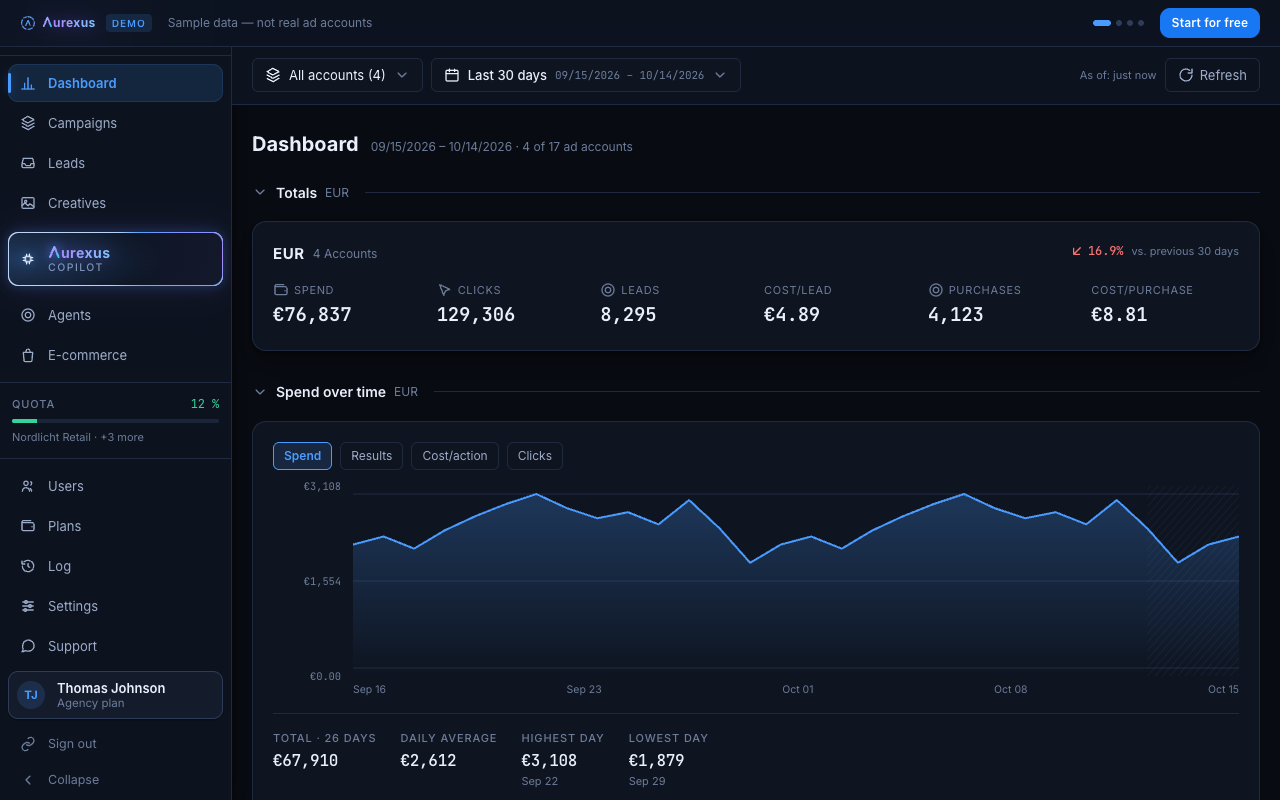
aurexus connects your Meta ad accounts through Meta's official Marketing API and shows them in one dashboard: spend, clicks, leads and cost per result, summed up per currency. The account filter groups your accounts by business portfolio, the same structure Meta uses, so you look at one portfolio or at all of them.
Below the totals, the campaign tree opens every account down to campaign, ad set and ad, in one table. From the Pro plan, colleagues get their own login and their own role per account (viewer, editor or owner). In the Agency plan, the number of ad accounts and portfolios has no limit. More on this for agencies on the page for agencies, and on the view itself on the dashboard page.
Frequently asked questions
How do I manage multiple Facebook ad accounts?
Keep the accounts in a business portfolio, give each person only the access they need, use the same naming in every account and check them from one view. The steps above go through each part.
Can I have multiple ad accounts on Facebook?
Yes. Inside a business portfolio you can create several ad accounts. Until you have made a confirmed payment, a business can create only one (Meta Business Help).
How many Meta ad accounts can I have?
Meta's help names two limits: one person can manage up to 25 ad accounts, and a business can create only one ad account until it has made a confirmed payment (Meta Business Help). Closed accounts still count.
How do I give someone access to a Meta ad account?
For someone in your own team: in Meta Business Suite, add the person to your business portfolio and assign the ad account (Meta Business Help). For an agency: add it as a partner and share the ad account with its business portfolio (Meta Business Help). Both need full control of the portfolio.
What is the difference between a business portfolio and an ad account?
The ad account is where your campaigns, budgets and payment method live. The business portfolio is the container above it: it holds several ad accounts, Pages and Instagram accounts and decides who in your company and which partners get access.