
A Meta Ads Manager alternative: all ad accounts in one dashboard
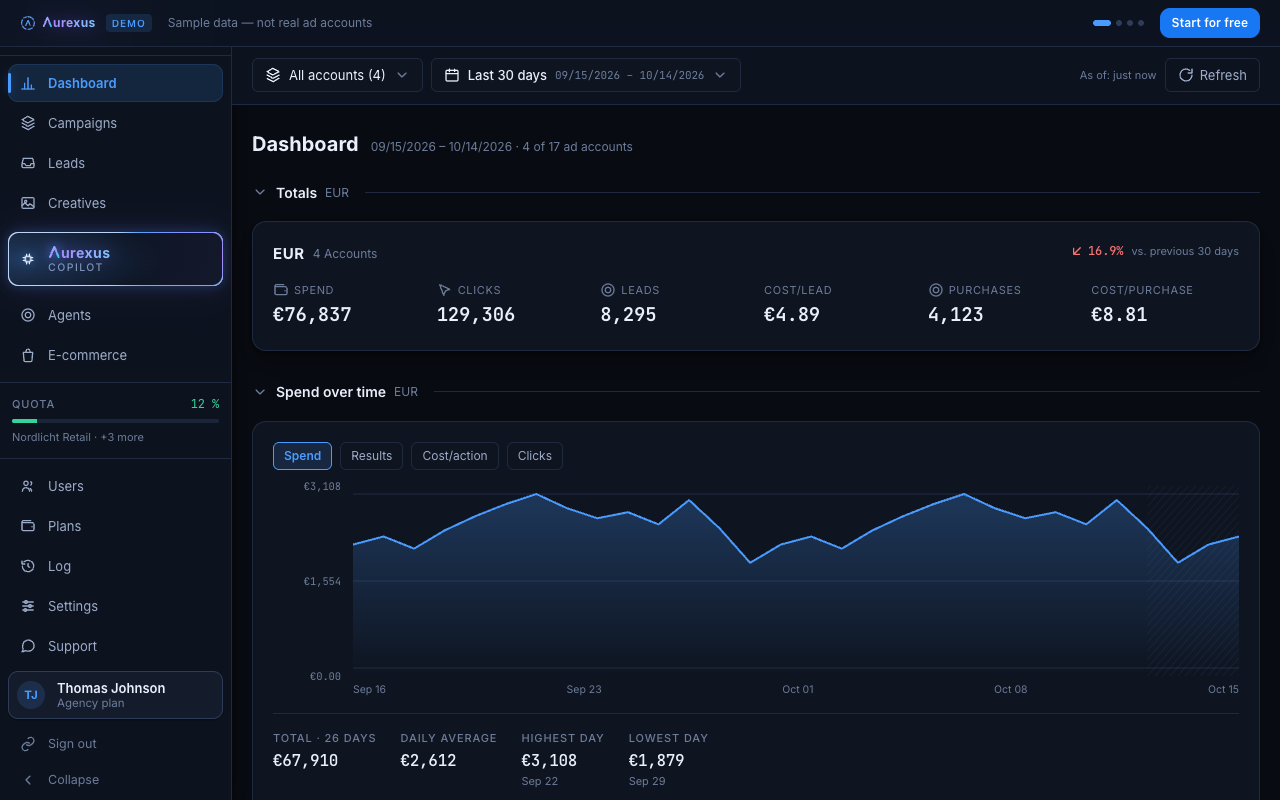
aurexus shows all your Meta ad accounts in one dashboard: spend, clicks, leads and cost per result, summed up per currency. Below the totals, campaigns, ad sets and ads sit in one tree across every connected account, so you see the whole picture before you open a single campaign.
Start is free forever — three ad accounts, one portfolio, no payment details.
What you see first
When you open aurexus, the dashboard answers the first question of the day: how much did we spend, and what did we get for it? Spend, clicks, leads and cost per result appear as totals across all connected ad accounts, one total per currency. You pick the accounts and the date range once, and every number on the screen follows.
The account filter groups your ad accounts by business portfolio, the same structure Meta uses: all accounts, one portfolio or single accounts. Agencies with many clients will find more on the page for agencies.
From the total down to the single ad
The campaign tree starts at the account and opens level by level: campaign, ad set, ad. It works across all accounts at once, so a campaign from client A and one from client B sit in the same table with the same columns. When a number looks wrong at the top, you open the tree until you reach the ad behind it.
Change budget, pause or bid, with undo
In the paid plans, you manage campaigns from the same view: budget, pause, bid. Every change goes into a log with the state before, the time and the person who made it. One button turns it back.
Ask about a number
In the plans Pro and Agency, the copilot reads campaigns, budgets, audiences and results live from Meta at the moment you ask. You ask why cost per result rose in one account, and you get an answer built on that account's current figures. The AI copilot suggests and prepares drafts. It changes nothing without your approval.
Ads Manager stays, aurexus adds the overview
aurexus is an alternative view on top of your Meta ad accounts. It works with the same campaigns through Meta's official Marketing API, so you keep using Ads Manager for whatever you like to do there. If you manage several accounts, the guide on managing multiple Facebook ad accounts explains how business portfolios and access roles fit in.
Frequently asked questions
Is there an alternative to Meta Ads Manager?
Yes. Tools like aurexus connect to your ad accounts through Meta's Marketing API and show the same campaigns in their own interface. aurexus focuses on a single view across all accounts, a campaign tree down to the ad and, in the paid plans, changes with an undo button.
Why is Facebook Ads Manager so complicated?
Ads Manager has to cover every objective, placement and setting Meta offers, on three levels: campaign, ad set and ad. On top of that, its reporting table shows the campaigns of the ad account you selected; for another account you switch (Meta Business Help). A dashboard that only shows the numbers you check every day removes a lot of that load.
Why is Facebook Ads Manager so slow?
If Ads Manager loads slowly or not at all, check Meta's status page first (Meta Status). Problems on Meta's side can only be fixed by Meta. A fresh browser window without extensions is a quick test for problems on your side.
What is a Meta ads dashboard?
A Meta ads dashboard puts the key figures of one or more ad accounts on one screen: spend, results and cost per result, usually over a date range you choose. In aurexus the dashboard covers all connected accounts, with one total per currency.
What is Meta ads management software?
Software that connects to your Meta ad accounts and lets you watch and change campaigns outside Ads Manager. aurexus adds a dashboard across accounts and, in the paid plans, campaign changes with a log and undo, a copilot and agents.