
Duplicate leads from Meta lead ads: causes and how to find them
In short
Duplicate leads from Meta usually have one of two causes: the same person submitted a form more than once, or the same lead reached your list twice, for example through overlapping downloads or two import paths. You find them by matching on email address and, where there is none, on phone number, both in a uniform format. Remove the extra rows before the list goes to sales, so nobody gets called twice.
Where duplicate leads come from
- The same person, more than once. Someone fills in your form, sees another of your ads with a different form a few days later and fills in that one too. You now have two leads from one person.
- Overlapping downloads. If you download leads by date range, two downloads can cover the same days. Meta Business Suite also offers Download new leads, which only exports the leads received since your last download (Meta Business Help).
- Two ways into the CRM. A CRM integration delivers the leads automatically, and someone imports a CSV file by hand as well. Every lead now exists twice.
- Several forms for one offer. If the same offer runs with different forms, one person can end up in several form exports, which you later merge.
Whether a repeat is a problem depends on your business. A second request after two weeks can be a warm lead; the same form twice in five minutes is noise.
How to find duplicate leads
Match on the contact details, not on the name. Names come in many spellings; an email address is much more stable.
- Normalize the email address. Lowercase it and remove spaces, so that Anna.Muster@example.com and anna.muster@example.com count as one.
- Normalize the phone number. Bring it into one format, so that +49 170 1234567 and 0170 1234567 count as the same number.
- Match on email first, then on phone. Use the phone number only where a lead has no email address.
- Keep the first entry, mark the rest. The first submission is the original; later ones are repeats. Sort by time first, so "first" really means first.
In a spreadsheet, sorting by the normalized email column already puts repeats next to each other. A count per email address shows which ones appear more than once.
How to remove duplicates before exporting
Decide first which entry stays. Usually that is the first one, because sales may already be working on it. If a later submission has newer answers, copy them into the first entry rather than keeping both rows.
Then delete the extra rows. If your file has a lead ID column, use it to remove exactly the repeats without touching the original. Leads stay available on Meta for 90 days only, so download regularly and clean each batch before it goes into your CRM (Meta Business Help).
Form settings that reduce repeat and low-intent submissions
Meta offers several form settings that make each submission more deliberate (Meta Business Help):
- Higher intent form type. It adds a review screen where people confirm their information, plus a note under the contact fields that your business may follow up. Meta describes it as a way to get more intentional submissions and fewer from people who are only marginally interested. It is delivered to Facebook and Instagram feeds on mobile devices only.
- Phone number verification. People confirm their mobile number with a one-time password before they submit (Meta Business Help).
- Work email validation. People must enter a work email address before they submit (Meta Business Help).
These settings make sloppy or accidental submissions less likely. Repeats that still arrive, you find afterwards with the steps above.
How aurexus helps
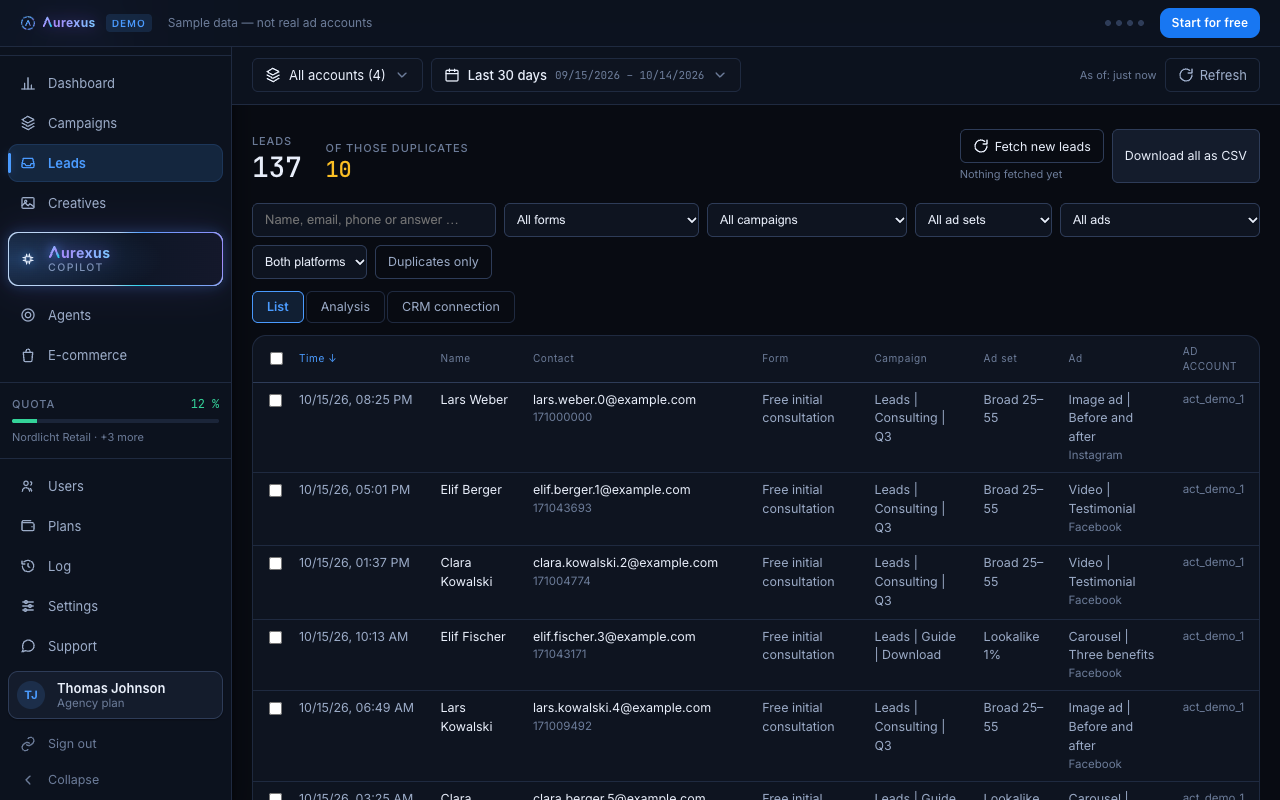
In aurexus, the leads from your connected ad accounts sit in one list, and a counter above it shows how many entries are repeats, under "of those duplicates": the same email address, or the same phone number where there is no email. aurexus normalizes both first, so upper and lower case in emails and different ways of writing a phone number don't hide a repeat.
The Duplicates only filter shows exactly the extra entries; the entry that reached aurexus first counts as the original and stays out of that view. To clean up a list:
- Switch on Duplicates only and check the entries.
- Export this filtered list as a CSV file. The export contains exactly the filtered or selected leads, each with its lead ID.
- Delete those rows from your full export or your spreadsheet by lead ID.
You can also search by name, email or phone number to check a single contact. aurexus doesn't remove repeats on its own; you decide what goes. The lead list, the filter and the export are part of the Agency plan. More on the page for lead generation; the overall numbers per ad account are on the dashboard.
Frequently asked questions
Why do I get duplicate leads from Meta?
Most often because the same person submitted more than one form or the same form again, or because the same leads were downloaded or imported twice. Overlapping date ranges in downloads are a common cause; Meta's Download new leads option only exports leads since the last download (Meta Business Help).
How do I find duplicate leads?
Match on the email address in lowercase and without spaces, and on the phone number in one uniform format where there is no email. Sort by time and treat the first entry as the original. In aurexus, the counter "of those duplicates" shows how many repeats there are and the Duplicates only filter lists them; there, the entry that reached aurexus first counts as the original.
How do I remove duplicates before exporting leads?
Find the repeats, keep the first entry and delete the others by their lead ID. In aurexus, filter by Duplicates only, export exactly those entries as a CSV file and remove those rows from your full list.
Can I prevent duplicate entries in the lead form?
You can make submissions more deliberate. The Higher intent form type adds a review screen (Meta Business Help), and phone number verification or work email validation add a check before submitting (Meta Business Help). Check for repeats in your lead list as well.