
Meta lead ads: every lead with ad, cost and a filter for repeats
aurexus shows the leads from your Meta lead ads in one list, each with its contact details, its origin down to the ad and what it cost. A counter shows how many entries are repeats of the same email address or phone number, and you export the list you have filtered as a CSV file.
Start is free forever — three ad accounts, one portfolio, no payment details.
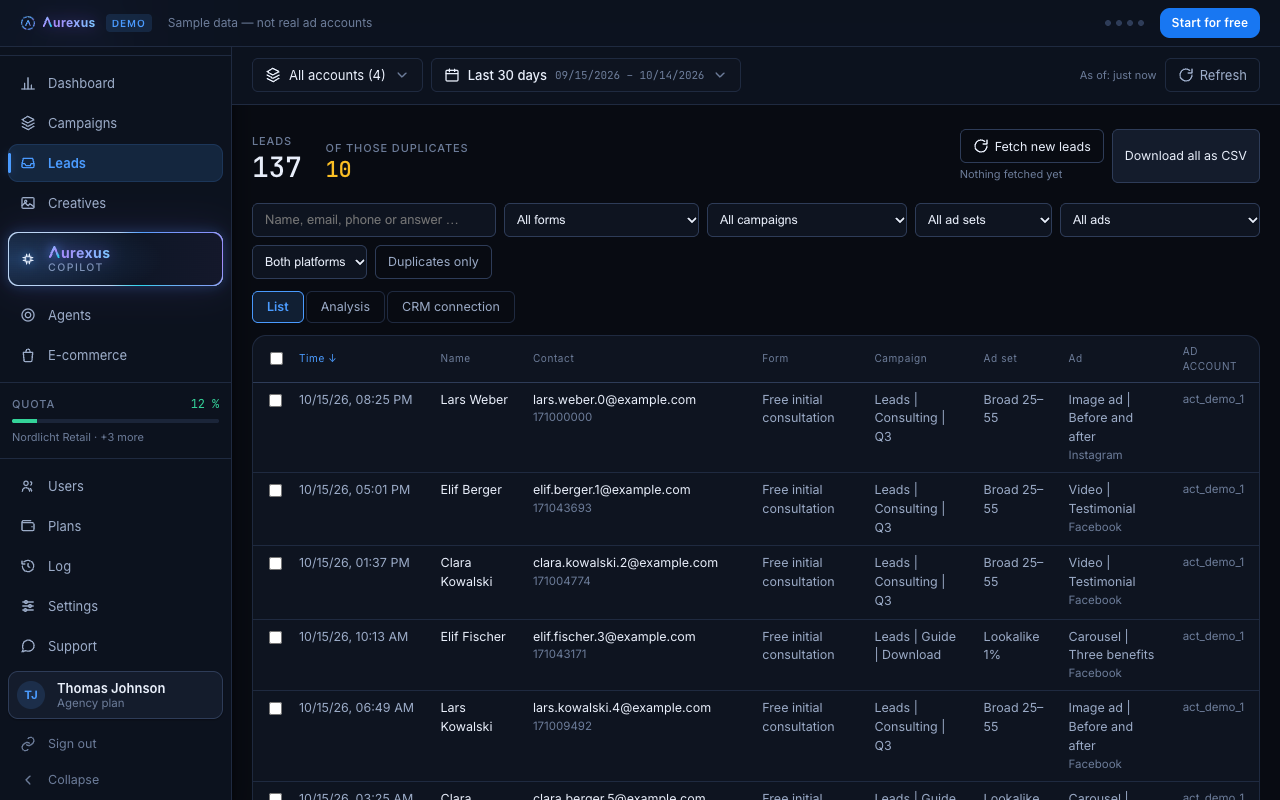
The gap between Ads Manager and the leads
Ads Manager tells you how many leads an ad brought. The leads themselves you download from Meta as a file, per ad or per form (Meta Business Help). To find out which ad brought the customer who called yesterday, you export twice and match by hand. Meta also keeps lead information available for only 90 days, so you have to download regularly.
Contact, origin and cost in one row
In aurexus, each lead sits in one row: the contact, the form, the campaign, ad set and ad it came from, and the cost. You filter by account, campaign, ad set, ad, form and platform, and you search by name, email or phone number.
Repeats you can see and filter
People sometimes fill in a form twice. aurexus counts these repeats above the list, under "of those duplicates": entries with the same email address, or the same phone number where there is no email. aurexus normalizes both first: email addresses ignore upper and lower case, and +49 170 1234567 and 0170 1234567 count as the same number.
The Duplicates only filter shows exactly the extra entries; the entry that reached aurexus first counts as the original and stays out of that view. That way you see who signed up more than once before the list goes to sales. Where repeats come from and how to clean a list step by step is covered in the guide on duplicate leads.
Export as CSV, exactly as filtered
The export creates a CSV file that opens in Excel. It contains the list you filtered or selected. Export the full list for your sales team, or export only the repeats to clean up a list you already have.
Straight into your CRM
With a webhook, aurexus fetches new leads every five minutes and passes them straight on to your CRM. If a delivery fails, aurexus tries a second time; after that, the lead stays in aurexus with a Send again button.
Plans
The lead list, repeat filter, export and CRM connection are part of the Agency plan. For the view across all your ad accounts, see the dashboard. For alerts when cost per lead tips, see Meta ads automation.
Frequently asked questions
What is the Meta lead ads testing tool?
A tool from Meta for developers that creates and deletes test leads for your instant forms. After you create a test lead, a status check shows whether it reached your webhook (Meta for Developers). Test leads are organic and not tied to an ad.
Why is the lead ads testing tool not working?
Three common reasons from Meta's documentation: the tool doesn't work while your app is in developer mode, a form can only have one test lead at a time, so you delete the old one before you create a new one, and the delivery status takes a few seconds to change from pending (Meta for Developers). If a CRM receives nothing, check in Meta Business Suite whether it has leads access (Meta Business Help).
Can I find duplicate Meta leads before I export them?
Yes. In aurexus, the counter "of those duplicates" shows how many entries repeat an email address or phone number, and the Duplicates only filter lists exactly those extra entries. You can export that filtered list as its own CSV file and remove those rows from your main list.
Can I search all leads from Meta in one place?
Yes. aurexus collects the leads from your connected ad accounts in one list. You search by name, email or phone number and filter by account, campaign, ad, form or platform.