
Meta ads automation: agents that check, report and act on approval
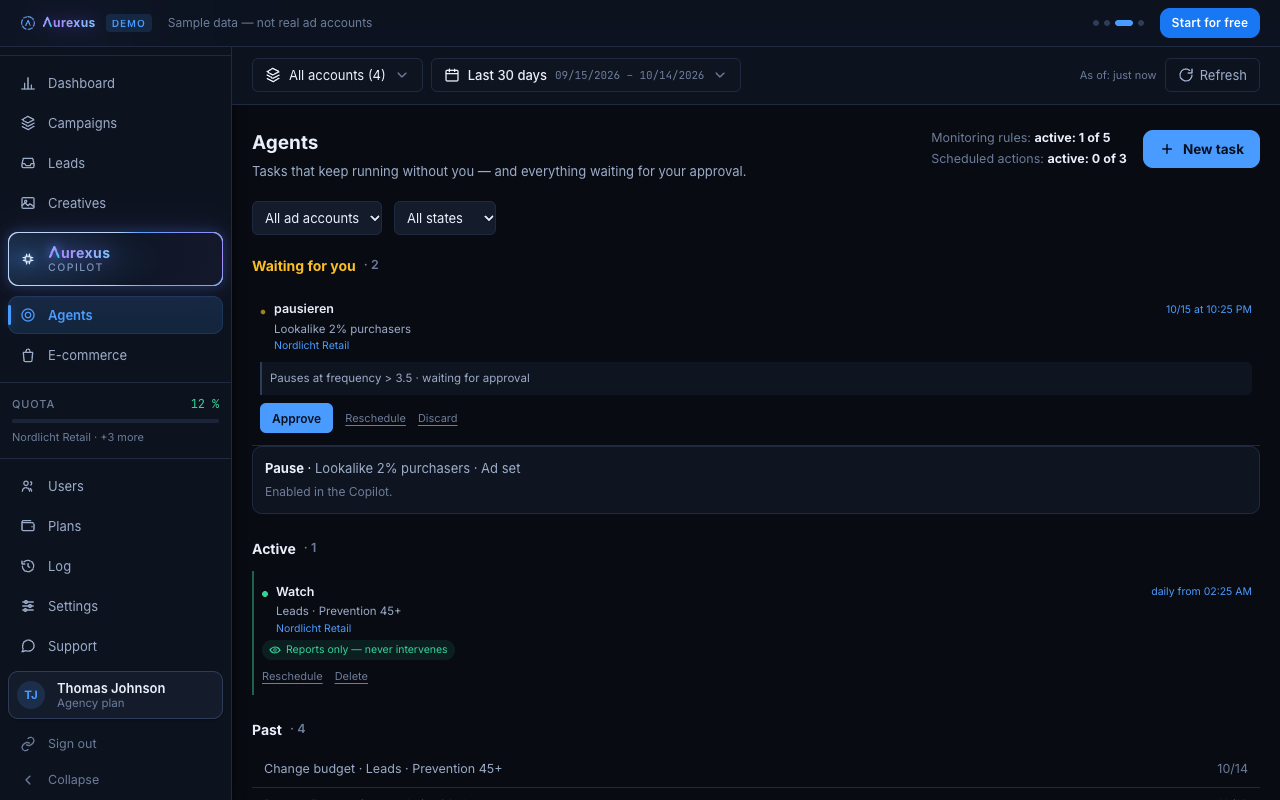
aurexus automates the checks you would otherwise do by hand in Ads Manager. An agent looks at a metric once at a set time or every day at a fixed hour, emails you when it tips and, if you allow it, pauses, switches back on or changes a budget. Every agent starts as a draft and runs only after a person approves it.
Start is free forever — three ad accounts, one portfolio, no payment details.
What an agent checks
An agent watches a condition you define: a metric, a threshold and a time window. For example, cost per result above a certain value over the last seven days. When the condition is met, the agent does what you told it to do. It checks either once, at a time you set, or every day at a fixed hour, also at night and at weekends. Two common uses: a warning when spend or impressions drop, a first sign that Meta ads stopped delivering, and a check on cost per result for keeping Meta ads costs down.
Report or act
There are two kinds of agents.
- Agents that report send you an email and change nothing. They suit the checks you want to see but decide yourself.
- Agents that act pause, switch back on or change a budget when the condition is met.
"Pause until the next day" lifts the pause again after midnight, so a campaign that burned through its budget in the morning is back the next day without you touching it.
Nothing runs without approval
Every agent starts as a draft. It does nothing until a person approves it. On top of that, write permissions are set per ad account and are off by default: an acting agent can only change an account after the account owner has switched them on under Settings, Write permissions per ad account. You can also ask the AI copilot to set up an agent; it lands on the same approval step.
Agents compared with Meta's automated rules
Meta's Ads Manager has its own automated rules. They check campaigns, ad sets and ads and can turn them off or on, adjust budgets or bids or send a notification (Meta Business Help). For many accounts that is enough. The guide on automated rules explains how to set them up and which rules make sense.
aurexus agents add a draft that only runs after your approval, a write switch per ad account and email reports that work the same across all your connected accounts.
Plans
Agents are part of the paid plans Pro and Agency. Agents that report and agents that act have separate limits per plan; in Agency there is no limit for either.
Frequently asked questions
What is the best Facebook ads automation software?
There is no single answer, because it depends on what you want to automate. Compare tools by four points: which data they check, what they may change, whether a person approves first and whether they cover all your ad accounts at once. Meta's own automated rules are the first thing to try for one account.
How do I monitor Meta ads around the clock?
With aurexus, an agent checks your metric every day at a fixed hour, at night and at weekends too, and emails you when the condition is met. Meta's automated rules check on a schedule you choose (Meta Business Help). Neither replaces a look at the results yourself every few days.
What is Meta ads AI automation?
Usually it means Meta Advantage+, which uses AI to optimize campaigns and match ads to the people most likely to take action (Meta Business Help). Tools like aurexus add agents that watch your own conditions and act on them after your approval.
Can I automate Meta ads with n8n instead?
Yes, if you want to build it yourself. A workflow tool like n8n can call Meta's Marketing API (Meta for Developers), but you take care of access, error handling and upkeep when Meta changes something. aurexus gives you the checks, the approval step and the email reports ready to use.
Who approves the changes agents make?
You do. Every agent starts as a draft and only runs after a person approves it. Acting agents also need write permissions for the ad account, which the account owner turns on.