
Facebook ads automated rules: setup, examples and limits
In short
Automated rules in Meta Ads Manager check your campaigns, ad sets and ads on a schedule and then make a change or notify you when a condition is met (Meta Business Help). A rule can turn ads off or on, adjust a budget or a manual bid, or just send a notification. You set it up once per ad account, and it applies whoever in your team creates the ads.
What an automated rule consists of
Each rule has three parts (Meta Business Help):
- The objects: the campaigns, ad sets or ads the rule applies to.
- The conditions: what has to be true, for example a cost per result above a value or a frequency above a number.
- The action: what happens when the conditions are met.
On top of that come a time range, which decides how many days of data the rule looks at, and a schedule, which decides how often the rule is checked (Meta Business Help).
The available actions are (Meta Business Help):
- turn campaigns, ad sets or ads off
- turn them on
- send a notification only
- adjust the daily or lifetime budget of an ad set
- adjust a manual bid (only for ads with manual bids)
- scale a budget or bid toward a target value
How to set up an automated rule
To apply a rule to specific campaigns, start from the campaigns table in Ads Manager (Meta Business Help):
- Tick the campaigns, ad sets or ads the rule should cover.
- Open the More menu and choose Create a new rule.
- Pick Custom rule, give it a name and check which objects it applies to.
- Choose the Action.
- Add the Conditions. With several conditions, the rule acts when all of them are met (Meta Business Help).
- Set the Time range and the Schedule.
- Add subscribers who should get notifications, then click Create.
The rule is active as soon as you create it. To cover all campaigns, ad sets or ads in the account instead, create the rule from the Automated rules page.
Rules that make sense
Start with rules that protect your budget. A few patterns that fit most accounts:
- Notify when costs rise. Action: send notification only. Condition: a cost metric such as cost per purchase above your target over the time range. You look before anything changes.
- Pause an ad set when frequency gets high. Meta's own example turns off ad sets when frequency, the average number of times a person sees your ad, goes above 2 (Meta Business Help). Pick a number that fits your audience size.
- Pause on high cost, but only with enough data. Meta's own example combines two conditions: cost per website purchase above $10 and more than 500 website purchases (Meta Business Help). The second condition keeps the rule from reacting to a handful of purchases.
- Turn a campaign off on a fixed day. Meta mentions the example of switching off a campaign every Friday (Meta Business Help).
Be careful with rules that raise budgets. A large budget change can send an ad set back into the learning phase (Meta Business Help).
Limits of automated rules
Meta sets a few limits (Meta Business Help):
- Up to 250 automated rules per ad account, active and inactive together.
- Each type of condition only once per rule.
- One rule applies to one level only: campaigns or ad sets, not both.
- Rules can't run on ads about social issues, elections or politics.
- Rules can't pause reservation campaigns.
Meta also notes that automated rules can save time, but that you should still keep an eye on overall performance (Meta Business Help).
Automatic adjustments are something else
Not every automatic change comes from your rules. With Advantage+ creative, Meta optimizes your images and videos into versions people are more likely to interact with, and some of these enhancements may be on by default (Meta Business Help). Check these settings when you set up an ad, since a rule won't show you what they changed.
How aurexus helps
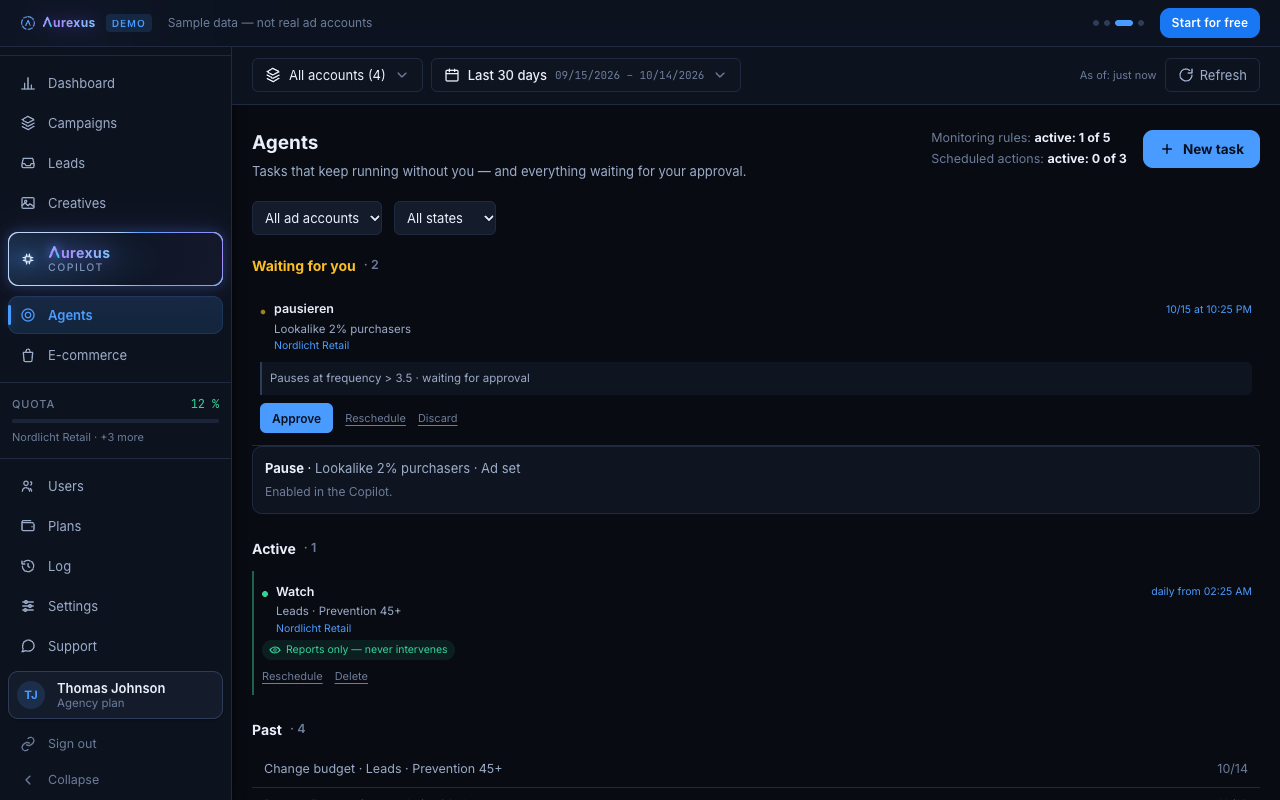
aurexus agents do the same job as a rule, with an approval step in front. An agent checks a condition such as cost per result above a value over the last days, once at a set time or every day at a fixed hour, including nights and weekends. When the condition is met, it emails you, pauses, switches back on or changes a budget.
The difference is in who decides. Meta's rule is active the moment you create it. An aurexus agent starts as a draft and only runs after a person approves it. Acting agents also need write permissions for the ad account, which are off by default and switched on by the account owner. You can describe an agent to the AI copilot in your own words; it ends up as a draft for approval as well. More on the automation page.
Frequently asked questions
What are automated rules in Facebook Ads Manager?
Rules that check your campaigns, ad sets and ads on a schedule and act when a condition is met: turn them off or on, adjust budgets or bids, or send a notification (Meta Business Help).
How do I set up automated rules for Meta ads?
In Ads Manager, tick the campaigns, ad sets or ads, open More and choose Create a new rule. Pick a custom rule, choose action, conditions, time range and schedule, then click Create (Meta Business Help).
Which Facebook ad rules make sense?
Rules that protect your budget: a notification when costs rise, a pause when frequency gets high and a pause on high cost that only fires once there is enough data. Be careful with rules that raise budgets, since large changes can restart the learning phase.
What are Meta's automatic adjustments?
Changes Meta makes to your ads on its own, for example Advantage+ creative enhancements that adjust images and videos to versions people are more likely to interact with. Some are on by default and can be turned off (Meta Business Help).
Can a rule pause ads automatically?
Yes. Choose the action that turns off campaigns, ad sets or ads and add the condition that should trigger it, for example a frequency above a certain number (Meta Business Help).